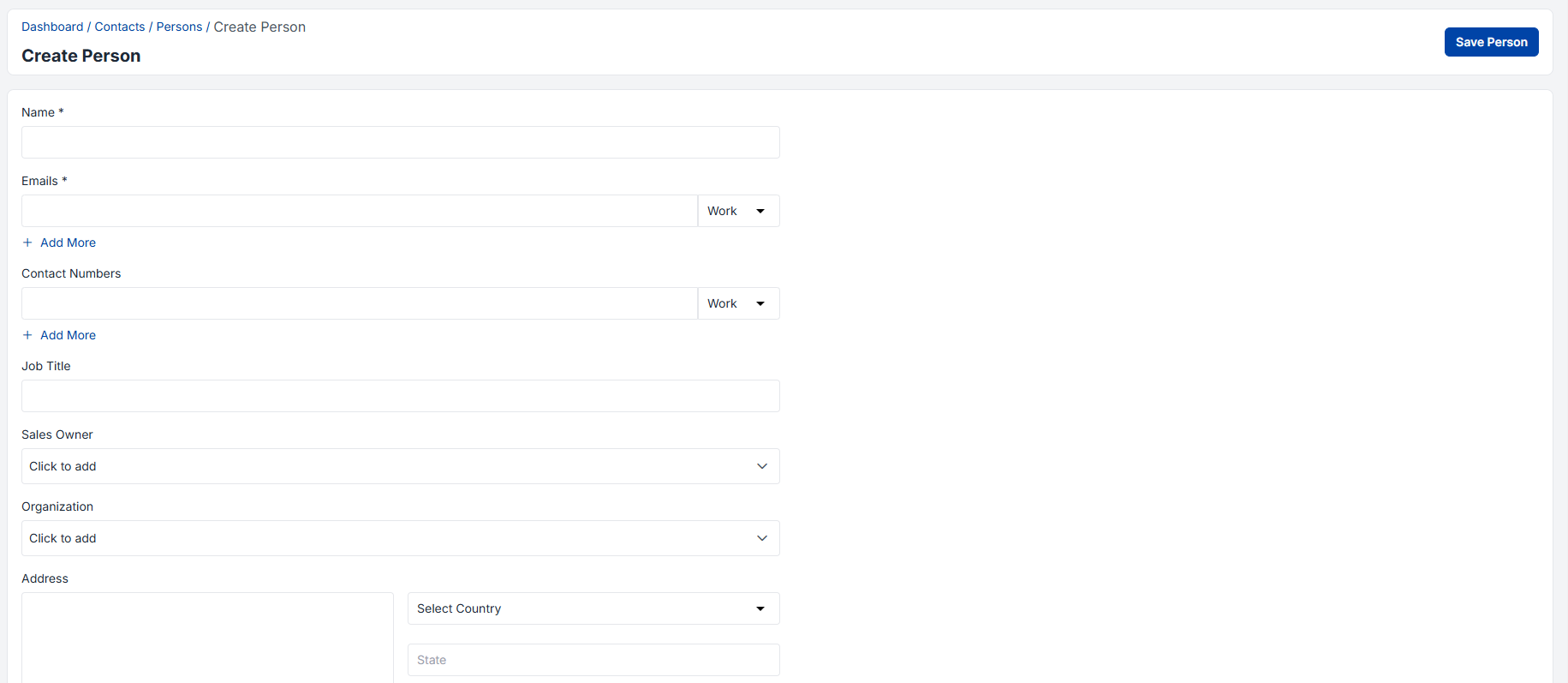
Detailed Person Creation Process – Step by Step

Step-by-Step Walkthrough:

Navigation: Admin Panel → Contacts → Persons → Create Person

Essential Information Fields

1. Name Field Configuration

  • Full Name Structure: First Name, Middle Initial, Last Name
  • Professional Titles: Dr., Prof., Mr., Ms., etc.
  • Name Variations: Nicknames, preferred names, cultural considerations
  • International Considerations: Different naming conventions and character sets

Best Practices:

  • Always use the person’s preferred name format
  • Include professional titles when formally addressing contacts
  • Maintain consistent naming conventions across your database
  • Consider cultural sensitivities in name formatting

2. Email Management System

The email system in Enterpristore CRM supports multiple email addresses per contact, each categorized by type and usage context.

Email Types and Categories:

  • Work Email: Primary business communication address
  • Personal Email: Alternative contact method for less formal communication
  • Executive Assistant Email: For high-level contacts with gatekeepers
  • Mobile Email: Mobile-specific addresses for urgent communications
  • Department Email: Shared departmental addresses

Email Validation Features:

  • Syntax Verification: Automatic format checking
  • Domain Validation: Verification of email domain existence
  • Deliverability Testing: Bounce-back detection and management
  • Duplicate Prevention: Automatic detection of duplicate email addresses
  • Privacy Compliance: GDPR and CAN-SPAM compliance tracking

Advanced Email Features:

  • Email Preference Management: Opt-in/opt-out tracking
  • Communication History: Complete email interaction timeline
  • Template Association: Link specific templates to contact preferences
  • Automation Integration: Trigger workflows based on email activities

3. Contact Number Management

The contact number system provides comprehensive phone communication management with intelligent categorization and formatting.

Contact Number Categories:

  • Primary Work: Main business phone number
  • Direct Line: Personal desk or office number
  • Mobile/Cell: Personal mobile phone
  • Home Phone: Residential contact number
  • Fax Number: Traditional fax communication
  • International Numbers: Global contact information with country codes

Advanced Phone Features:

  • Auto-Formatting: Automatic number formatting based on country codes
  • Click-to-Call Integration: Direct dialing from CRM interface
  • Call Logging: Automatic activity creation for phone interactions
  • Do Not Call Management: Compliance with communication preferences
  • Time Zone Awareness: Optimal calling time recommendations
Communication Preferences:

  • Preferred Contact Method: Email, phone, text, or in-person preference
  • Best Contact Times: Optimal hours for reaching the contact
  • Communication Frequency: Preferred interaction frequency
  • Language Preferences: Primary communication language

4. Job Title and Role Definition

Job titles provide crucial context for understanding a contact’s influence, decision-making authority, and role in the buying process.

Job Title Categories:

  • Executive Level: CEO, President, VP, Director positions
  • Management Level: Manager, Supervisor, Team Lead roles
  • Specialist Level: Senior, Analyst, Specialist, Coordinator positions
  • Administrative Level: Assistant, Administrator, Support roles
  • Technical Level: Engineer, Developer, Architect, Consultant roles

Role Analysis Features:

  • Decision Making Authority: Level of purchasing decision influence
  • Budget Authority: Financial approval capabilities
  • Technical Influence: Technology evaluation and selection impact
  • User Influence: End-user adoption and satisfaction impact
  • Process Influence: Workflow and procedure decision impact

Strategic Insights:

  • Stakeholder Mapping: Visual representation of organizational influence
  • Communication Strategy: Tailored messaging based on role and authority
  • Sales Process Optimization: Role-appropriate sales approaches
  • Champion Identification: Recognizing internal advocates

5. Sales Owner Assignment

Sales owner assignment establishes clear account responsibility and ensures consistent relationship management.

Assignment Strategies:

  • Geographic Territory: Regional or location-based assignments
  • Industry Vertical: Specialized expertise alignment
  • Account Size: Enterprise, mid-market, or SMB specialization
  • Product Line: Specific product or service expertise
  • Relationship History: Existing relationship continuity

Sales Owner Responsibilities:

  • Primary Relationship Management: Main point of contact responsibility
  • Activity Coordination: Scheduling and managing interactions
  • Opportunity Development: Lead qualification and conversion
  • Account Strategy: Long-term relationship planning
  • Team Coordination: Facilitating cross-functional collaboration

Advanced Assignment Features:

  • Team-Based Assignments: Multiple owners for complex accounts
  • Temporary Assignments: Coverage during absences or transitions
  • Escalation Paths: Clear hierarchy for issue resolution
  • Performance Tracking: Owner effectiveness measurement

6. Address Information Management

Address data provides geographic context and enables location-based marketing, sales planning, and service delivery.

Address Components:

  • Street Address: Complete physical location
  • City/State/Province: Administrative divisions
  • Postal/ZIP Code: Delivery and geographic identification
  • Country: International location specification
  • Time Zone: Automatic calculation for communication timing

Address Types:

  • Business Address: Primary work location
  • Billing Address: Financial transaction location
  • Shipping Address: Product or service delivery location
  • Home Address: Personal residence (if relevant)
  • Mailing Address: Correspondence delivery location

Geographic Intelligence Features:

  • Territory Mapping: Automatic territory assignment based on location
  • Route Optimization: Efficient travel planning for field sales
  • Local Regulations: Compliance with regional business requirements
  • Market Analysis: Geographic performance and opportunity analysis

7. Organization Association

Linking persons to organizations creates powerful relationship networks and provides organizational context for all interactions.

Organization Relationship Types:

  • Employee: Direct employment relationship
  • Contractor: Temporary or project-based relationship
  • Consultant: Advisory or specialist relationship
  • Partner: Business partnership association
  • Customer: Client relationship designation

Organizational Hierarchy Mapping:

  • Reporting Structure: Management and subordinate relationships
  • Department Association: Functional area alignment
  • Project Teams: Cross-functional group membership
  • Decision Networks: Influence and authority mapping

Relationship Intelligence:

  • Influence Mapping: Understanding internal political dynamics
  • Communication Paths: Optimal routing for organizational communication
  • Change Management: Tracking organizational restructuring impacts
  • Opportunity Identification: Recognizing expansion possibilities within organizations
create-person-step-by-step