
The Settings module in Enterpristore CRM serves as the central command center for system administration, allowing administrators to configure, customize, and optimize the CRM environment to match organizational workflows and business requirements. This comprehensive control panel enables fine-tuned management of user access, data organization, automation processes, and system integrations.
Enterpristore CRM Settings: Complete Administrative Guide
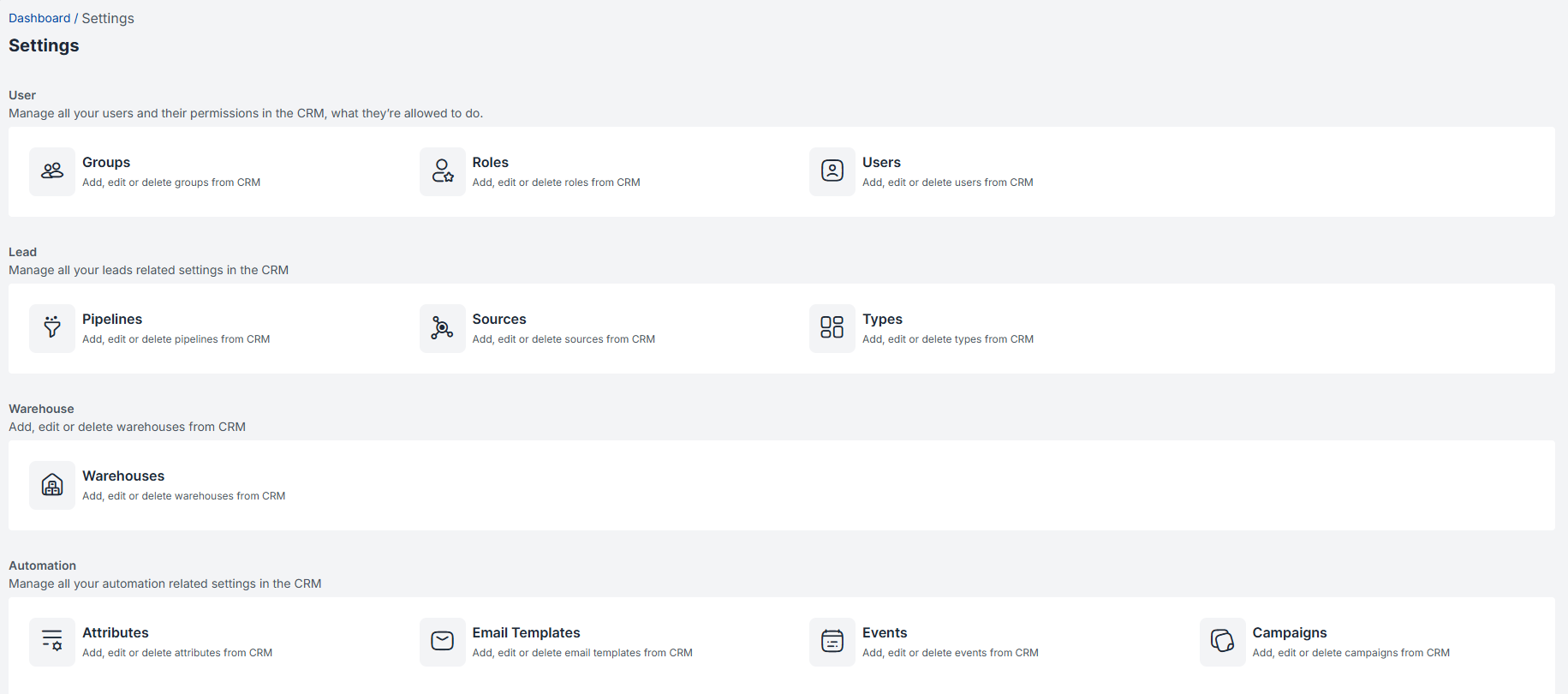
Overview of Settings Module
1. Groups Management
What Are Groups?
Groups in Enterpristore CRM function as dynamic categorization tools that allow you to segment contacts, leads, and customers based on specific business criteria. Think of groups as digital folders that automatically organize your customer database for targeted marketing, personalized communication, and streamlined sales processes.
Key Benefits of Groups:
- Targeted Marketing: Send relevant campaigns to specific customer segments
- Sales Efficiency: Prioritize high-value prospect groups
- Performance Analytics: Track conversion rates by customer categories
- Automated Workflows: Trigger specific actions based on group membership
Demographic Groups:
- Geographic location (Region, City, Country)
- Industry verticals (Healthcare, Manufacturing, Technology)
- Company size (SMB, Mid-market, Enterprise)
- Job titles/roles (Decision Makers, Influencers, End Users)
Behavioral Groups:
- Engagement level (High, Medium, Low interaction)
- Purchase history (First-time buyers, Repeat customers, VIP clients)
- Product interests (Specific service categories)
- Communication preferences (Email, Phone, In-person)
Sales Pipeline Groups:
- Lead quality (Hot, Warm, Cold)
- Deal size potential (High-value, Standard, Small)
- Sales stage positioning
- Conversion probability
Group Management Best Practices:
- Start Simple: Begin with 3-5 core groups and expand gradually
- Regular Maintenance: Review and update group criteria monthly
- Avoid Overlap: Ensure clear distinction between group categories
- Document Criteria: Maintain clear definitions for group membership rules
2. Roles & Permissions System
Understanding CRM Roles
Roles in Enterpristore CRM establish a hierarchical permission structure that controls system access, data visibility, and functional capabilities. Each role represents a job function with specific responsibilities and corresponding system privileges.Administrator Role:
Roles in Enterpristore CRM establish a hierarchical permission structure that controls system access, data visibility, and functional capabilities. Each role represents a job function with specific responsibilities and corresponding system privileges.Administrator Role:
- Full System Access: Complete control over all CRM functions
- User Management: Create, modify, and deactivate user accounts
- Settings Configuration: Modify system-wide settings and workflows
- Data Management: Access to all customer data and analytics
- Integration Control: Manage third-party integrations and API access
Sales Representative Role:
- Lead Management: Create, edit, and manage assigned leads
- Activity Tracking: Log calls, meetings, and other customer interactions
- Opportunity Management: Move deals through pipeline stages
- Customer Communication: Access to email templates and communication tools
- Report Generation: Personal performance and activity reports
Customer Service Role:
- Ticket Management: Handle customer support requests
- Customer Data Access: View customer history and interaction records
- Knowledge Base: Access to product information and troubleshooting guides
- Communication Tools: Email templates for customer service scenarios
- Case Escalation: Authority to escalate complex issues
Sales Manager Role:
- Team Oversight: Manage assigned sales team members
- Pipeline Management: View and modify sales pipeline stages
- Performance Analytics: Access team and individual performance reports
- Lead Assignment: Distribute leads among team members
- Deal Approval: Authority for discount approvals and special terms
Marketing Role:
- Campaign Management: Create and execute marketing campaigns
- Lead Generation: Manage webforms and lead capture mechanisms
- Content Creation: Develop email templates and marketing materials
- Analytics Access: Campaign performance and ROI metrics
- List Management: Segment and manage marketing contact lists
Custom Role Creation:
- Modular Permissions: Mix and match specific capabilities
- Department-Specific: Create roles tailored to unique organizational needs
- Temporary Access: Grant limited-time permissions for projects
- Compliance Integration: Ensure roles meet regulatory requirements
3. User Management System
User Lifecycle Management User Onboarding Process:
- Account Creation: Set up user credentials and basic information
- Role Assignment: Apply appropriate permission levels
- Training Resources: Provide system training materials
- Mentor Assignment: Pair new users with experienced team members
- Progress Monitoring: Track initial system adoption and usage
User Profile Components:
- Personal Information: Name, contact details, job title
- System Preferences: Language, timezone, notification settings
- Access Credentials: Username, password requirements, two-factor authentication
- Department Assignment: Team/group membership for collaboration
- Performance Metrics: Activity levels, conversion rates, goal achievement
Advanced User Features:
Single Sign-On (SSO) Integration:
- Active Directory: Corporate credential synchronization
- Google Workspace: Gmail and calendar integration
- Microsoft 365: Outlook and Teams connectivity
- Third-Party Identity Providers: SAML and OAuth compatibility
User Activity Monitoring:
- Login Tracking: Monitor system access patterns
- Feature Usage: Identify most/least used functionality
- Performance Analytics: Track individual and team productivity
- Security Auditing: Monitor for unusual access patterns
4. Sales Pipeline Configuration
Pipeline Architecture
The sales pipeline in Enterpristore CRM represents the systematic progression of prospects through defined stages, from initial awareness to final purchase decision. This visual framework enables sales teams to track progress, forecast revenue, and optimize conversion strategies.
Default Pipeline Stages:
- Lead Generation Stage
- Objective: Capture and qualify initial prospect interest
- Activities: Marketing campaigns, webform submissions, referrals
- Success Metrics: Lead volume, source effectiveness, initial qualification rate
- Duration: Typically 1–7 days
- Initial Contact Stage
- Objective: Establish communication and assess opportunity potential
- Activities: First phone call, email introduction, needs assessment
- Success Metrics: Contact rate, response rate, meeting scheduling success
- Duration: 3–10 days
- Qualification Stage
- Objective: Determine budget, authority, need, and timeline (BANT)
- Activities: Discovery calls, stakeholder identification, requirement gathering
- Success Metrics: Qualification rate, opportunity value assessment
- Duration: 1–3 weeks
- Proposal/Demo Stage
- Objective: Present solutions and demonstrate value proposition
- Activities: Product demonstrations, proposal creation, technical discussions
- Success Metrics: Demo-to-proposal conversion, proposal acceptance rate
- Duration: 2–4 weeks
- Negotiation Stage
- Objective: Address objections and finalize terms
- Activities: Price negotiations, contract discussions, stakeholder buy-in
- Success Metrics: Negotiation success rate, average discount given
- Duration: 1–6 weeks
- Closed Won/Lost Stage
- Objective: Complete transaction or document loss reason
- Activities: Contract signing, onboarding initiation, loss analysis
- Success Metrics: Close rate, average deal size, customer lifetime value
Custom Pipeline Creation:
- Industry-Specific Stages: Tailor pipeline to business model requirements
- Probability Weighting: Assign conversion probabilities to each stage
- Automated Transitions: Set up triggers for automatic stage progression
- Approval Workflows: Require manager approval for certain stage movements
5. Lead Sources Management
Source Tracking Importance
Understanding lead sources enables data-driven decisions about marketing investments, channel optimization, and resource allocation. Proper source attribution provides insights into customer acquisition costs and ROI by channel.
Primary Source Categories:
Digital Marketing Sources:
- Website Organic: Direct website visitors and organic search traffic
- Paid Search: Google Ads, Bing Ads, and other search engine marketing
- Social Media: LinkedIn, Facebook, Twitter, Instagram campaigns
- Content Marketing: Blog posts, whitepapers, webinars, case studies
- Email Marketing: Newsletter campaigns, drip sequences, promotional emails
Traditional Marketing Sources:
- Trade Shows: Industry events, conferences, exhibitions
- Print Advertising: Magazine ads, newspaper placements, brochures
- Radio/TV: Broadcast advertising campaigns
- Direct Mail: Physical mailers, postcards, catalogs
- Outdoor Advertising: Billboards, transit ads, signage
Referral Sources:
- Customer Referrals: Existing client recommendations
- Partner Referrals: Channel partner and vendor recommendations
- Employee Referrals: Internal team member connections
- Professional Networks: Industry associations, networking groups
Sales-Generated Sources:
- Cold Calling: Outbound prospecting efforts
- Cold Email: Direct email outreach campaigns
- LinkedIn Outreach: Social selling activities
- Networking Events: Personal relationship building
Source Attribution Best Practices:
- First-Touch Attribution: Credit the initial source that brought the lead
- Multi-Touch Attribution: Recognize all touchpoints in the customer journey
- Source Validation: Regularly verify and clean source data
- ROI Calculation: Track cost-per-lead and conversion rates by source
6. Lead/Customer Types Management
Business Classification System
Types in Enterpristore CRM help categorize prospects and customers based on business characteristics, enabling tailored sales approaches and specialized service delivery.
Standard Type Categories:
Business Maturity Types:
- New Business: First-time prospects with no prior relationship
- Existing Business: Current customers seeking additional products/services
- Returning Business: Previous customers re-engaging after absence
- Competitor Conversion: Prospects switching from competitor solutions
Business Size Types:
- Enterprise: Large organizations (500+ employees, $100M+ revenue)
- Mid-Market: Medium-sized businesses (50–500 employees, $10M–$100M revenue)
- Small Business: Growing companies (10–50 employees, $1M–$10M revenue)
- Startup: Early-stage companies (<10 employees, <$1M revenue)
Industry-Specific Types:
- Healthcare: Hospitals, clinics, medical practices
- Financial Services: Banks, insurance companies, investment firms
- Manufacturing: Production facilities, supply chain companies
- Technology: Software companies, IT services, telecommunications
- Retail: E-commerce, brick-and-mortar stores, distribution
Custom Type Creation:
- Regional Classifications: Geographic or cultural business distinctions
- Product-Specific Types: Different types for various product lines
- Service Level Types: Different support and service requirements
- Compliance Types: Businesses with specific regulatory requirements
7. Custom Attributes System
Attribute Functionality
Attributes extend the standard CRM data fields by allowing custom information storage that reflects unique business requirements and customer characteristics.Attribute Categories:
Attributes extend the standard CRM data fields by allowing custom information storage that reflects unique business requirements and customer characteristics.Attribute Categories:
Contact Attributes:
- Professional Information: Job level, decision-making authority, department
- Communication Preferences: Preferred contact method, best contact times
- Personal Interests: Hobbies, industry associations, networking groups
- Relationship History: Previous interactions, referral sources, connection strength
Company Attributes:
- Business Characteristics: Revenue range, employee count, growth stage
- Technology Stack: Current systems, integration requirements, IT capabilities
- Market Position: Competitive landscape, market share, expansion plans
- Financial Information: Credit rating, payment terms, budget authority
Opportunity Attributes:
- Deal Characteristics: Deal size, product mix, implementation timeline
- Competitive Landscape: Competing vendors, evaluation criteria, decision factors
- Stakeholder Information: Decision-making process, influence mapping
- Risk Assessment: Implementation complexity, success probability, potential obstacles
Attribute Data Types:
- Text Fields: Short text, long text, rich text formatting
- Numeric Values: Currency, percentages, whole numbers, decimals
- Date Fields: Single dates, date ranges, recurring dates
- Selection Lists: Single select, multi-select, hierarchical options
- Boolean Values: Yes/no, true/false checkboxes
- File Attachments: Documents, images, videos, presentations
8. Email Template Management
Template Strategy
Email templates in Enterpristore CRM streamline communication by providing consistent, professional, and personalized messaging for various customer interaction scenarios.
Template Categories:
Sales Communication Templates:
- Initial Outreach: Cold email introductions, follow-up sequences
- Meeting Requests: Scheduling invitations, confirmation messages
- Proposal Delivery: Professional proposal presentations, terms explanations
- Negotiation Communication: Pricing discussions, contract clarifications
- Closing Messages: Deal completion, next steps, onboarding information
Marketing Communication Templates:
- Newsletter Templates: Regular company updates, industry insights
- Promotional Campaigns: Product launches, special offers, event invitations
- Educational Content: Tips and tricks, best practices, case studies
- Event Marketing: Webinar invitations, conference announcements
- Nurture Sequences: Automated drip campaigns, relationship building
Customer Service Templates:
- Welcome Messages: New customer onboarding, account setup
- Support Communications: Ticket acknowledgments, status updates, resolutions
- Renewal Notifications: Contract renewals, upgrade opportunities
- Feedback Requests: Satisfaction surveys, testimonial requests
- Maintenance Updates: System updates, scheduled downtime notifications
Template Personalization Features:
- Dynamic Fields: Automatic insertion of contact names, company information
- Conditional Content: Different content blocks based on customer attributes
- Merge Tags: Integration with CRM data for personalized messaging
- A/B Testing: Template performance comparison and optimization
- Delivery Tracking: Open rates, click-through rates, response tracking
9. Workflow Automation
Workflow Architecture
Workflows in Enterpristore CRM automate repetitive business processes, ensuring consistency, reducing manual errors, and improving team efficiency through systematic task execution.
Common Workflow Types:
Lead Management Workflows:
- Lead Assignment: Automatic distribution based on territory, product, or capacity
- Lead Scoring: Point-based qualification using behavior and demographic data
- Lead Nurturing: Automated email sequences based on engagement levels
- Follow-up Reminders: Scheduled tasks for sales team activities
- Lead Conversion: Automatic opportunities creation when criteria are met
Sales Process Workflows:
- Opportunity Progression: Automated stage advancement based on activities
- Approval Processes: Manager approval for discounts or special terms
- Quote Generation: Automated proposal creation and delivery
- Contract Management: Document routing and signature collection
- Won Deal Processing: Customer onboarding and success team handoff
Customer Service Workflows:
- Ticket Routing: Automatic assignment based on issue type or severity
- Escalation Procedures: Time-based escalation to higher support tiers
- Customer Communication: Automated status updates and resolution notifications
- Satisfaction Surveys: Post-resolution feedback collection
- Knowledge Base Updates: Continuous improvement based on common issues
Workflow Building Components:
- Triggers: Events that initiate workflow execution
- Conditions: Logic gates that determine workflow paths
- Actions: Tasks performed when conditions are met
- Delays: Time-based pauses in workflow execution
- Branches: Multiple workflow paths based on different conditions
10. Web Forms Integration
Form Functionality
Web forms serve as digital bridges between your website and CRM system, automatically capturing visitor information and converting anonymous traffic into qualified leads.
Form Types and Applications:
Lead Capture Forms:
- Contact Us Forms: General inquiry collection with routing capabilities
- Demo Request Forms: Product demonstration scheduling with qualification questions
- Download Forms: Gated content access requiring contact information
- Newsletter Signup: Email list building with preference selections
- Quote Request Forms: Pricing inquiry capture with project details
Advanced Form Features:
- Progressive Profiling: Gradual information collection over multiple visits
- Conditional Logic: Dynamic form fields based on previous responses
- Multi-Step Forms: Breaking complex forms into manageable sections
- File Upload Capability: Document and image submission functionality
- Integration Validation: Real-time data verification and duplicate detection
Form Optimization Strategies:
- Minimalist Design: Reduce form fields to essential information only
- Mobile Responsiveness: Ensure forms work seamlessly on all devices
- Clear Value Proposition: Communicate benefits of form completion
- Trust Indicators: Privacy policy links, security badges, testimonials
- A/B Testing: Continuous optimization of form elements and placement
11. Tagging System
Tag Strategy and Implementation
Tags function as flexible metadata labels that provide additional context and categorization beyond standard CRM fields, enabling sophisticated data segmentation and targeted communication.
Tag Categories and Applications:
Behavioral Tags:
- Engagement Level: “High Engager”, “Email Responsive”, “Social Media Active”
- Purchase Behavior: “Frequent Buyer”, “Price Sensitive”, “Bulk Purchaser”
- Communication Preference: “Prefers Email”, “Phone First”, “Text Friendly”
- Service Usage: “Heavy User”, “Support Frequent”, “Self-Service Preferred”
Demographic Tags:
- Geographic: “West Coast”, “International”, “Remote Location”
- Industry Specific: “Healthcare”, “FinTech”, “Manufacturing”
- Company Size: “Fortune 500”, “SMB”, “Startup”
- Job Function: “IT Decision Maker”, “Budget Holder”, “End User”
Campaign and Source Tags:
- Campaign Specific: “Q4 2024 Campaign”, “Trade Show Lead”, “Webinar Attendee”
- Content Interaction: “Downloaded Whitepaper”, “Watched Demo”, “Attended Event”
- Marketing Channel: “Organic Search”, “Paid Social”, “Referral Program”
- Lifecycle Stage: “MQL”, “SQL”, “Opportunity”, “Customer”
Tag Management Best Practices:
- Consistent Naming: Establish clear tag naming conventions
- Regular Cleanup: Remove outdated or duplicate tags
- Team Training: Ensure consistent tag application across users
- Performance Tracking: Monitor tag effectiveness for segmentation
- Integration Planning: Consider how tags work with other CRM features
Settings Integration and Best Practices
Holistic Settings Strategy
The true power of Enterpristore CRM settings emerges when all components work together harmoniously, creating a customized system that reflects your unique business processes and requirements.
Implementation Roadmap:
- Assessment Phase: Analyze current processes and identify customization needs
- Planning Phase: Design settings configuration that supports business objectives
- Implementation Phase: Configure settings systematically with proper testing
- Training Phase: Educate users on new configurations and best practices
- Optimization Phase: Continuously refine settings based on user feedback and performance data
Change Management Considerations:
- User Impact Assessment: Evaluate how settings changes affect daily workflows
- Communication Strategy: Keep users informed about upcoming changes
- Training Resources: Provide comprehensive documentation and training materials
- Rollback Planning: Maintain ability to revert changes if issues arise
- Performance Monitoring: Track system performance after settings modifications
By leveraging these comprehensive settings capabilities, Enterpristore CRM becomes a powerful, customized platform that adapts to your unique business requirements while maintaining the flexibility to evolve with your growing organization.