
Enterpristore CRM Activities

What Are CRM Activities?

Activities in Enterpristore CRM represent the backbone of customer relationship management, serving as documented touchpoints that track every meaningful interaction between your team and prospects or customers. These activities create a comprehensive timeline of engagement, ensuring no opportunity falls through the cracks and enabling seamless team collaboration.

Why Activities Matter:

  • Relationship Building: Track the progression of relationships from initial contact to closed deals
  • Team Coordination: Multiple team members can see interaction history and plan follow-ups
  • Performance Analytics: Measure team productivity and identify successful engagement patterns
  • Compliance & Documentation: Maintain detailed records for regulatory requirements and quality assurance
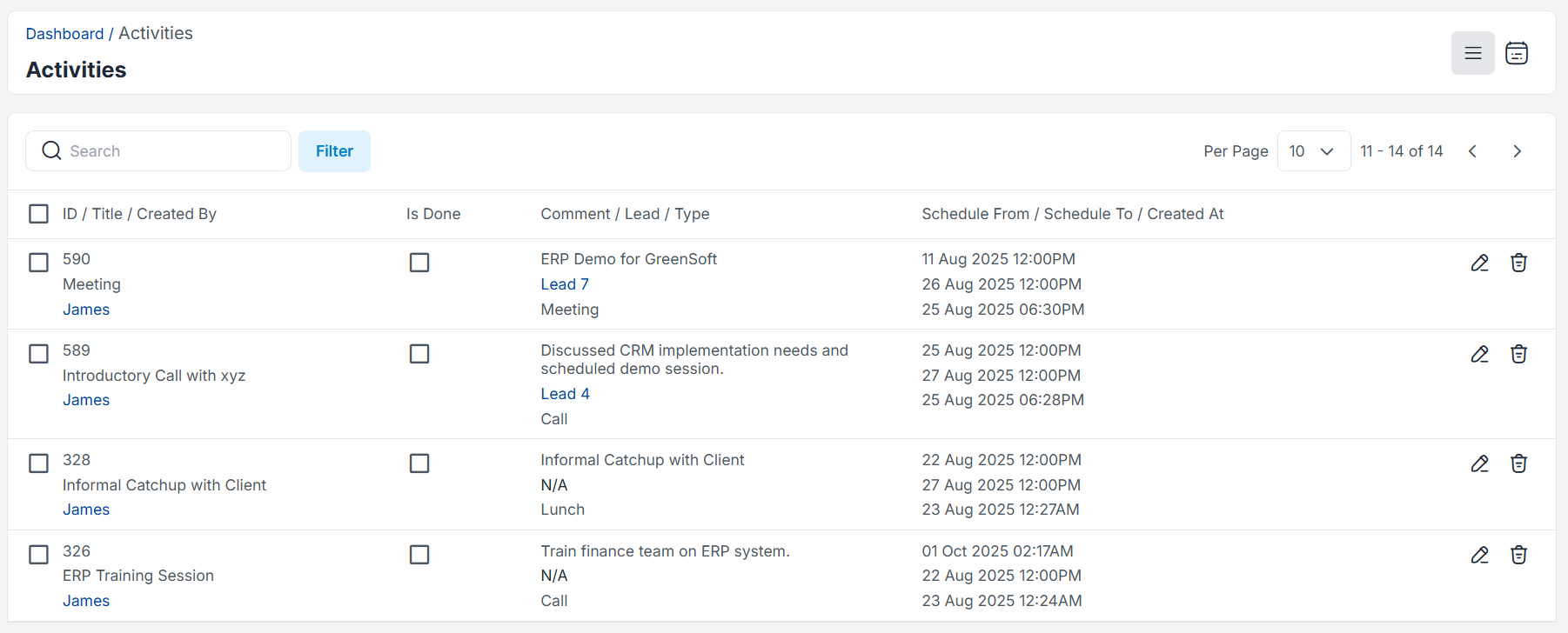
activites

Default Activity Types in Enterpristore CRM

  1. Call Activities
  • Purpose: Document phone conversations, voicemails, and telephonic interactions
  • Best Use Cases:
    • Initial prospect outreach
    • Follow-up conversations
    • Technical support calls
    • Deal negotiation discussions
  • Pro Tip: Always log call outcomes and next steps to maintain momentum
  1. Lunch Activities
  • Purpose: Record informal relationship-building interactions
  • Best Use Cases:
    • Networking events
    • Client entertainment
    • Relationship maintenance
    • Casual business discussions
  • Pro Tip: These activities often yield the most authentic relationship insights
  1. Meeting Activities
  • Purpose: Track in-person, virtual, or hybrid meetings
  • Best Use Cases:
    • Product demonstrations
    • Contract negotiations
    • Quarterly business reviews
    • Onboarding sessions
  • Pro Tip: Include meeting agendas and action items in the description

Advanced Activity Management Features

Activity Grid Overview
The activity grid provides a comprehensive view of all activities with sortable columns and quick-action buttons. Key features include:

  • Status Indicators: Visual cues for completed, scheduled, or overdue activities
  • Priority Levels: Flag high-importance activities for immediate attention
  • Quick Actions: One-click options for common tasks like rescheduling or duplicating activities

Calendar Integration
The calendar view transforms your activities into a visual timeline:

  • Daily/Weekly/Monthly Views: Choose the perspective that matches your workflow
  • Color Coding: Different colors for activity types enable quick visual scanning
  • Drag-and-Drop Rescheduling: Easily adjust timing without opening individual records
  • Conflict Detection: Automatic alerts for scheduling overlaps

Activity Filtering System

Default Filters:

  • Title: Search by keywords or phrases
  • Created By: Track team member productivity
  • Lead: View all activities for specific prospects
  • Schedule From/To: Time-based filtering for planning
  • Created At: Historical activity analysis
Advanced Filtering Tips:

  • Combine multiple filters for precise results
  • Save frequently used filter combinations
  • Use date ranges to analyze activity patterns
  • Filter by activity outcomes for success analysis

Best Practices for Activity Management

Before Creating Activities:

  1. Preparation: Review previous activities and lead history
  2. Goal Setting: Define clear objectives for each interaction
  3. Resource Gathering: Prepare relevant materials and talking points

After Activity Completion:

  1. Outcome Documentation: Record results and customer responses
  2. Lead Scoring Updates: Adjust lead ratings based on engagement
  3. Team Notifications: Alert relevant team members of important developments

During Activity Creation:

  1. Real-Time Logging: Create activities immediately after interactions
  2. Detail Capture: Include specific quotes, concerns, and commitments
  3. Follow-Up Planning: Schedule next steps before closing the activity

Integration with Enterpristore CRM Workflow

Lead Progression Tracking
Activities serve as milestones in the lead journey:

  • Awareness Stage: Initial calls and introductory meetings
  • Consideration Stage: Product demos and detailed discussions
  • Decision Stage: Proposal meetings and negotiation calls

Team Collaboration Enhancement

  • Handoff Protocols: Activities ensure smooth transitions between team members
  • Knowledge Sharing: Activity histories prevent information silos
  • Performance Benchmarking: Compare individual and team activity metrics

Sales Pipeline Impact
Well-documented activities directly influence:

  • Lead Scoring: Activity frequency and quality affect lead ratings
  • Opportunity Progression: Activities trigger stage advancements
  • Forecasting Accuracy: Historical activity patterns improve predictions

Reporting and Analytics Opportunities

Activity Performance Metrics

  • Activity-to-Conversion Ratios: Identify most effective interaction types
  • Response Time Analysis: Measure follow-up speed and its impact on success
  • Participation Patterns: Understand which team combinations yield best results
Strategic Insights

  • Customer Engagement Trends: Identify preferred communication channels
  • Seasonal Patterns: Adjust activity planning based on historical data
  • Resource Allocation: Optimize team schedules based on activity effectiveness

Troubleshooting Common Issues

Activity Management Challenges:

  1. Incomplete Information: Implement mandatory field requirements
  2. Scheduling Conflicts: Use calendar integration for real-time availability
  3. Follow-Up Gaps: Set automatic reminders for pending activities
  4. Data Inconsistency: Establish team-wide activity logging standards

By leveraging these comprehensive activity management features in Enterpristore CRM, your team can build stronger customer relationships, improve conversion rates, and create a more organized, efficient sales process that scales with your business growth.