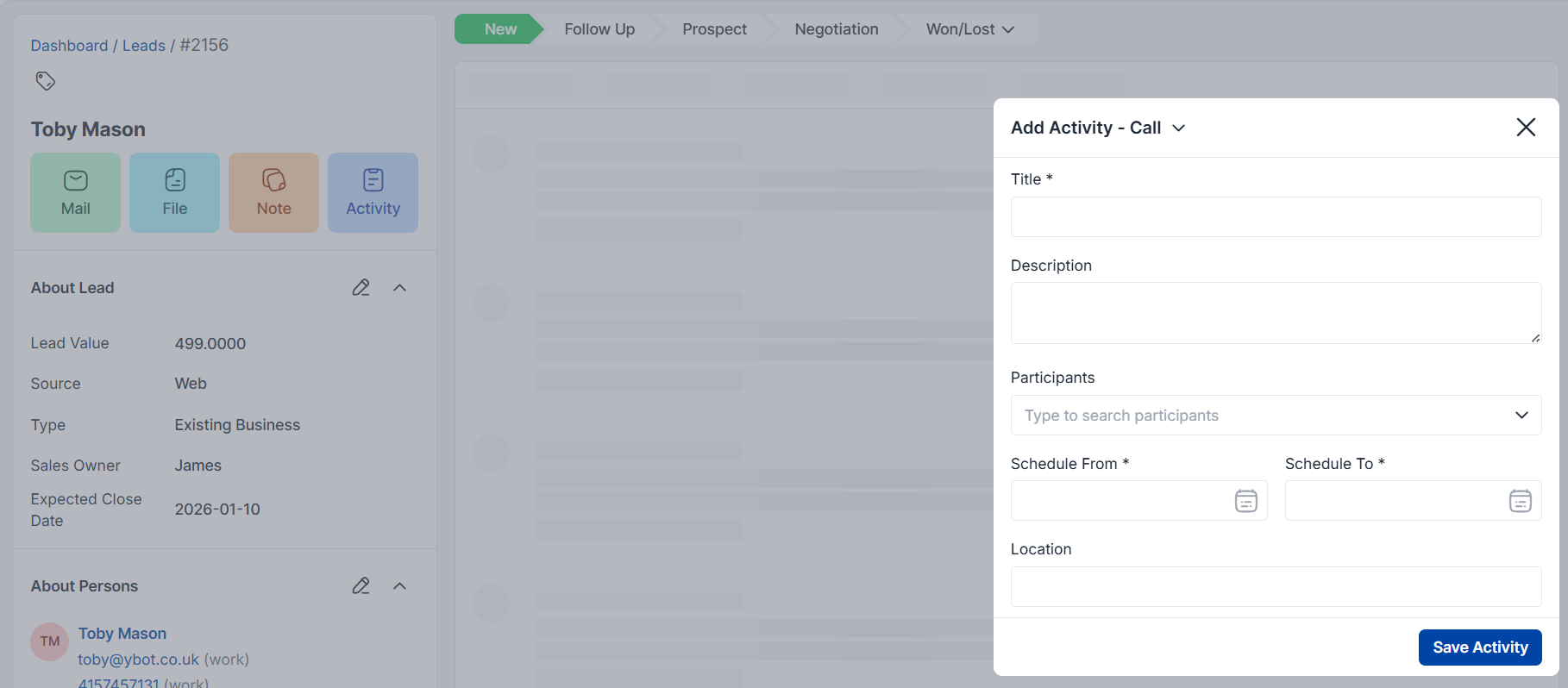
Navigation Path: Admin Panel → Leads → Select Lead → Activity Tab
Detailed Activity Creation Workflow Step-by-Step Process:
1. Activity Type Selection
- Choose from Call, Lunch, or Meeting
- Consider the interaction’s formality level and primary purpose
- Each type has different reporting metrics and follow-up workflows
2. Title Field
Best Practices:
- Use descriptive, searchable titles
- Include key topics or outcomes
- Examples: “Q4 Budget Discussion – XYZ Corp”, “Product Demo Follow-up Call”
3. Description Field
What to Include:
- Key discussion points
- Customer pain points discovered
- Objections raised and responses
- Next steps agreed upon
- Customer sentiment and engagement level
- Formatting Tips: Use bullet points for clarity and easy scanning
4. Participants Management
- Internal Participants: Sales reps, account managers, technical specialists
- External Participants: Customer contacts, decision-makers, influencers
- Benefits: Ensures all stakeholders are informed and can contribute to follow-up activities
5. Scheduling System
From/To Date Selection:
- For planned activities: Set future dates
- For completed activities: Log actual duration
- Use realistic timeframes to avoid calendar conflicts
- Time Zone Considerations: Ensure consistency across global teams
6. Location Details
- Physical Meetings: Complete address, building/floor details
- Virtual Meetings: Platform details (Zoom, Teams, etc.) and meeting links
- Phone Calls: Note if customer or prospect location is relevant