
Enterpristore CRM - Products

Overview of Products in Enterpristore CRM

The Products section in Enterpristore CRM is designed to seamlessly integrate product management into your customer relationship workflows. It provides robust tools and functionalities that empower businesses to manage their inventory, link products to leads, generate quotes or orders, and track product-related activities—all within a single platform.

With the integration of Enterpristore Ecommerce, the CRM enables you to view all linked products, access product details, and take quick actions like placing quotes or orders. This integration ensures that your sales and customer management efforts are streamlined, enhancing efficiency and driving business growth.

Key functionalities include:

  • Centralized Product Management: View, create, edit, and delete products directly from the CRM interface.
  • Linked Products: Access products from Enterpristore Ecommerce, ensuring alignment between inventory and sales.
  • Quote & Order Placement: Generate quotes or place orders directly from the CRM, saving time and simplifying workflows.
  • Enhanced Search & Filtering: Locate products quickly using advanced filters like SKU, name, and price range.
  • Actionable Insights: Use linked product data to make informed decisions during lead qualification and customer interactions.
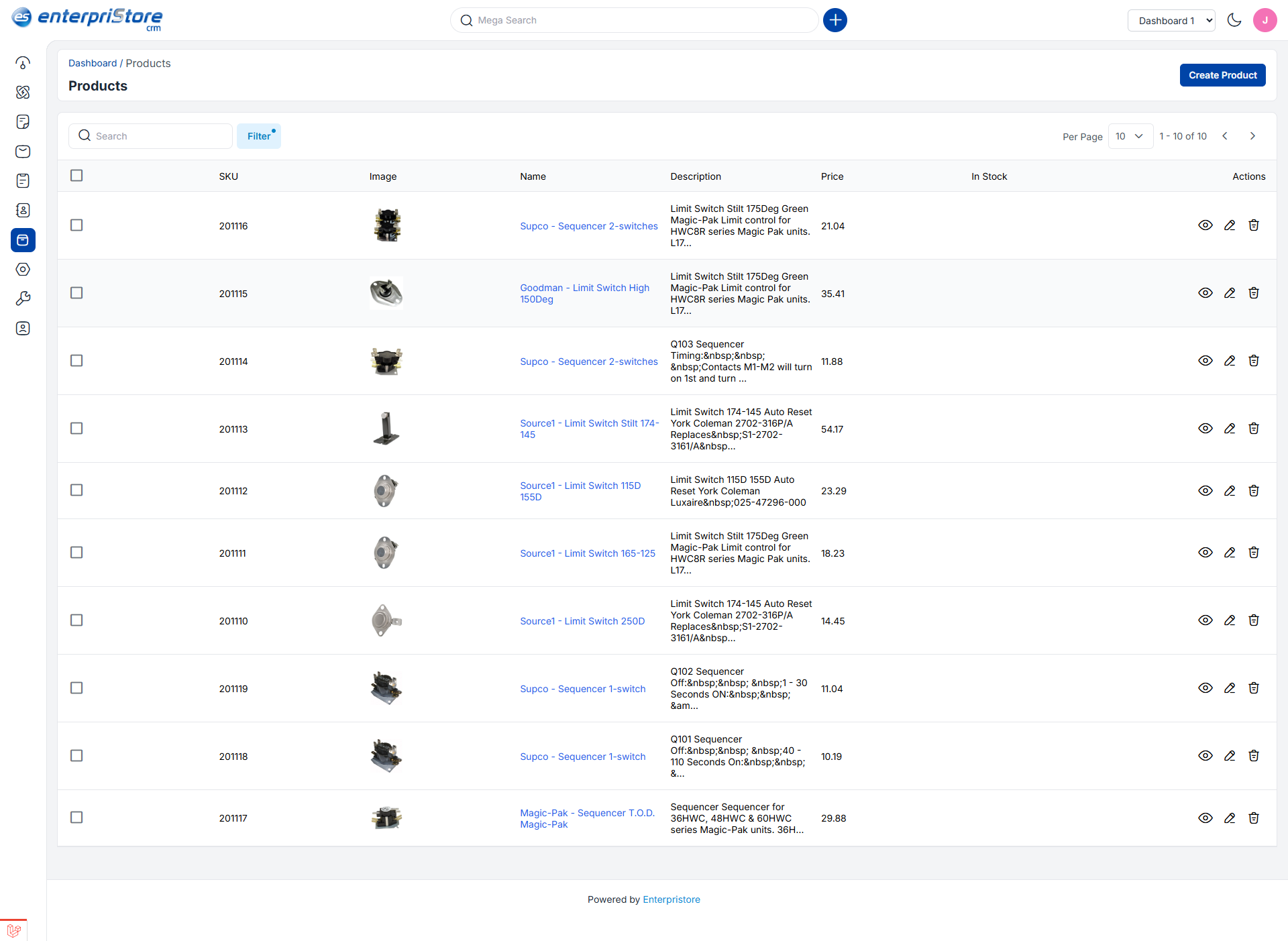
Products

Creating Products in Enterpristore CRM

Follow these steps to create and manage products efficiently:

Step 1: Navigate to the Create Product Page

Access the Admin Panel in Enterpristore CRM and click on
Products >> Create Product. This will take you to the product creation interface, as illustrated in the image below.

Step 2: Enter Product Details

Fill in the required fields to set up a new product:

  1. Name: Enter a clear, descriptive name for the product.
  2. Description: Provide a concise description of the product, highlighting its features, benefits, and potential use cases.
  3. SKU: Input the unique Stock Keeping Unit (SKU) for inventory and tracking purposes.
  4. Price: Specify the product’s price, ensuring it aligns with your pricing strategy and market conditions.

Once all details are entered, click on the Save Product button to store the product information.

Step 3: View and Manage Product Records

After saving, the new product will appear in the Product Data Grid, where you can easily manage and track product information.

The grid provides a comprehensive view of all products, including their names, SKUs, prices, and descriptions.

Managing Products in Enterpristore CRM

Mass Delete Products
Effortlessly delete multiple products at once by selecting the checkbox next to each product you want to remove.
After making your selections, click on the Delete button.

This feature helps maintain a clean and organized product list, especially for businesses with extensive inventories.

Using Filters to Locate Products
Streamline product searches with advanced filters:

  • SKU: Filter products by their unique Stock Keeping Unit.
  • Product Name: Search by entering part or all of the product name.
  • Price: Use price ranges to find products that meet specific budget requirements.

These filters allow you to locate products quickly and efficiently, as depicted in the image below.

Actions You Can Perform on Products

A) Edit Products
Modify product details such as name, description, SKU, or price by navigating to the
Edit option in the action menu.
After making changes, click on the Save Product button to update the product information.
B) Delete Products

Remove unnecessary products permanently by clicking the
Delete button in the action menu.
This ensures your product database remains relevant and up-to-date.

C) View Products
Access detailed product information by clicking the
View button. From here, you can:

  • Add files or attachments related to the product.
  • Include notes for additional context or updates.
  • Review all associated data in the
    Notes,
    Files, and
    All sections.

Linking Products to Leads

One of the standout features of Enterpristore CRM is the ability to assign products while creating or managing leads. This functionality ensures that all relevant product information is linked to your sales pipeline, providing a comprehensive view of customer needs and enabling faster quote generation or order placement.

Benefits of Product Management in Enterpristore CRM

  • Streamlined Workflows: Manage products, leads, and quotes from a unified platform.
  • Enhanced Productivity: Save time with efficient product creation, filtering, and management tools.
  • Improved Customer Experience: Link products to leads and orders to deliver personalized solutions.
  • Integrated Sales Process: Combine product data with CRM functionalities to optimize sales and revenue generation.

By leveraging the Products module in Enterpristore CRM, businesses can simplify inventory management, enhance customer interactions, and drive sustainable growth.